
12 November 2024 • Cyber security

Cybersecurity awareness is vital for any organization, not just for regulatory compliance, but to ensure the safety of employees and clients. Ninjio is an awareness training solution that aims to fulfil this need.
What is Ninjio?
Ninjio’s goal is a security awareness training platform that aims to develop good cybersecurity habits through greater awareness. This can help prevent security breaches caused by human error.
How does Ninjio work?
Ninjio is a cloud-based platform using a SaaS (Software as a Service) model. Administrators and learners log onto the platform and operate the system from a dashboard. Everything is browser-based, with all major browsers supported.
The first step after account creation is to onboard learners. This can be done through a bulk user upload from a CSV file. If an organization uses an identity management system, such as Windows Active Directory, Ninjio can interface with the system and create user accounts automatically. For smaller groups of learners, manual entry is also possible.
Once the learner accounts have been created, users activate their accounts, confirm details and update their profiles. They may then be shown an introduction that explains how the platform works. Meanwhile, admins can set up the training programs and phishing simulations.
Learners are assessed to find out their current skill level and can then begin receiving regular training modules. The frequency and types of materials can be set by the admin. As learners progress and interact with Ninjio’s phishing simulations, the learning program will automatically adapt to their knowledge level and learning style.
Training is delivered through animated videos, each with a story that illustrates some topic relating to digital security. Learners will also take interactive quizzes to test their knowledge. Ninjio’s phishing simulator, Phish3d, allows admins to send automated emails to employees to test the recipient’s awareness.
Learners are evaluated as they progress through the training program, both through their performance on quizzes and tests and through their engagement with the Phish3d emails. If a learner is unsuccessful in completing a test or is taken in by a phishing simulation, they’ll be given additional training by Ninjio.
Pros of Ninjio
Cloud-based: Ninjio’s SaaS model means that there’s no local installation to set up. This makes it scalable and means that IT/security departments don’t have to divert energy from their core tasks to keep it running.
Ease of deployment: Ninjio is relatively simple to set up and deploy when compared to some of its competitors.
Multi-platform: Ninjio’s browser-based interface can be accessed from any device that supports a modern browser. This makes it easy for learners to watch videos or take quizzes while on the go.
Fun, engaging content: Ninjio’s training videos are designed to be entertaining and memorable, with higher production values than most similar training materials. The videos are kept short and impactful so that learners will recall the content.
Realism: Ninjio’s videos draw on recent security incidents in the real world, making them relevant and relatable for learners.
Customizable: Companies can add their logos and branding to training materials, as well as tailor messages to align with their internal policies.
Flexibility: Organizations can determine the training schedules, including the frequency with which learners receive training content and phishing simulations.
Up-to-date content: Ninjio’s training library is regularly updated to reflect the latest developments in the threat landscape.
Gamification: Learners are rewarded for successful participation. They can score points and compete with their peers for spots on a leaderboard.
Cons of Ninjio
Basic-level content: The material only covers more basic security concepts. Higher-level learners such as IT or digital security professionals might find Ninjio dull and uninspiring.
Limited interactivity: While there are interactive elements, most of the training is done through Ninjio’s video library. This means that learning can become a passive experience rather than an active one.
Pre-defined lessons: Some customization is available, but organizations with specific training needs may find that it doesn’t go far enough to cover their requirements.
Limited language support: Ninjio does offer multilingual content but does not support as many languages as some of its competitors. There’s less effort made to make content culturally relatable across different regions of the world.
Cartoon style: The videos are all animated cartoons. While this may make them more engaging and fun for most viewers, some might find this kind of presentation demeaning or childish. It can also make Ninjio a harder sell for some companies.
Admin dashboard: While learners generally find the platform easy to use, some administrators struggle with the admin dashboard.
Cost: While less expensive than some competing solutions, Ninjio’s high cost could be a barrier to adoption for some organizations.
Considering Ninjio? See the alternative first.
Ninjio teaches through video. Guardey builds the habit with weekly challenges of three minutes that your team actually finishes.
Start your free 14-day trialWhat makes Ninjio unique?
Ninjio’s stand-out feature is its approach to its video content. Ninjio puts a lot of effort into creating its training videos, bringing in professional animators and crafting an engaging narrative with relatable characters. They describe their approach to video content as “Hollywood-style values.” Videos are short, slick and easy to digest, featuring descriptive voice-overs that make them suitable for visually impaired users. The majority of reviewers are impressed with this aspect of the platform.
Another popular feature is Ninjio’s SaaS, multi-device model. Learners like being able to access training material from their phones and other mobile devices, something that not all of Ninjio’s competitors offer.
Which companies use Ninjio?
Ninjio has thousands of customers worldwide, including big names across a range of different sectors. These include Get. It Recruit (HR services), Jobber (IT services and consulting), Dole Asia and Henry Ford Health.
What customers say about Ninjio
Below, we’ve listed some reviews by Ninjio users.
“My users appreciate the short, timely trainings that are about current or recent topics and are well explained.” – G2
“The interface is not intuitive at all and feels like functionality is missing.” – G2
“Ninjio is a solid product that offers RELEVANT videos on security events that recently happened. They’re quick, fun, and memorable.” – G2
“The content is engaging. Since we have launched the training platform, we have received overwhelming positive response. People really WANT to take the training. This includes requests from some offices that want to leverage the back catalog to get ‘extra’ training to their employees.” – G2
“The admin console was recently changed and in my opinion it wasn’t for the better.” – G2
“While Ninjio has a back catalog of previously released monthly videos, I actually wish Ninjio could publish more awareness videos per month. Even 2 per month would get more content in front of my users, but still seem lightweight to them.” – G2
Who is the CEO of Ninjio?
The CEO of Ninjio is Gary Noke, an experienced chief executive who has occupied numerous senior management positions in the world of SaaS. Immediately prior to starting at Ninjio, Noke was the CEO of Intensify, a marketing technology company. He holds a BA in Economics from Hamilton College.
Where is Ninjio located?
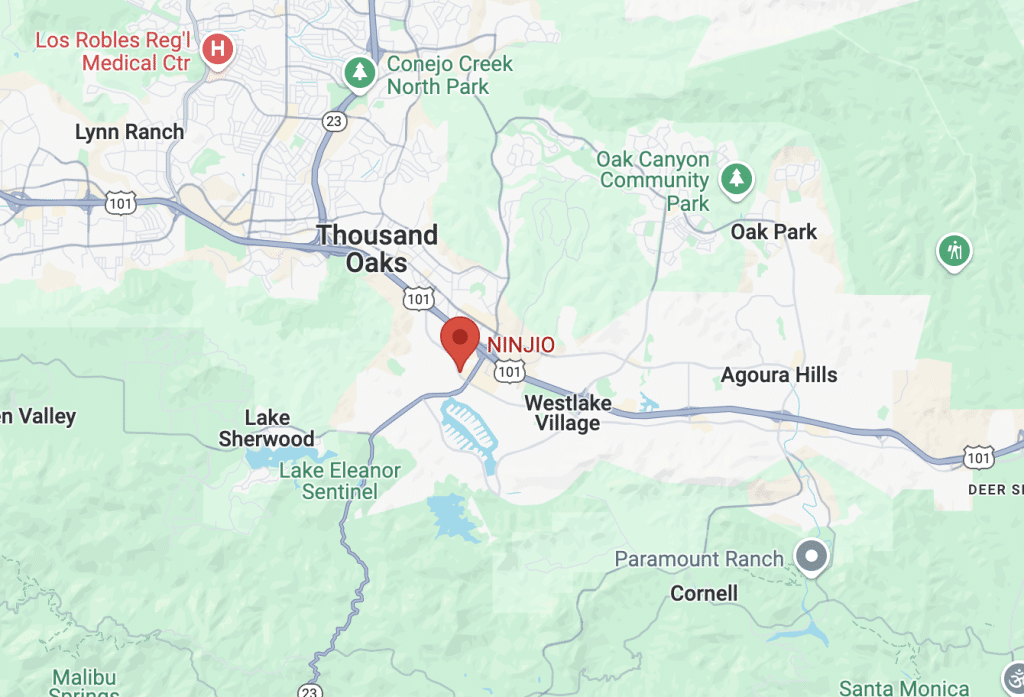
Ninjio is headquartered in Westlake Village, California.
What to use instead of Ninjio
There are various organizations that look for alternatives to Ninjio for several reasons:
- Ninjio’s content is too long-winded and time-consuming
- The animations are perceived as childish by employees
- The training style doesn’t stimulate active learning
If you’re looking for a way to train your employees in a way that doesn’t take a lot of their time and keeps them engaged, Guardey can be your go-to solution.
Guardey – Duolingo for security awareness training
Guardey enhances security awareness training with gamification to make learning enjoyable. Users engage in brief, 3-minute micro-challenges each week, covering diverse topics like phishing, device security, CEO fraud, password protection, and more.
To maintain engagement, Guardey employs several gamification strategies:
- Weekly challenges: Users earn bonus points for maintaining streaks.
- Storytelling: Players defend a fictional organization against cyber risks throughout the game.
- Achievements: Badges are awarded for high scores or completing many challenges.
- Leaderboard: A company-wide leaderboard encourages friendly competition among team members.

Guardey is often referred to as the Duolingo of security awareness training. With short and fun challenges, we make the learning experience engaging and effective.
Still comparing? Do it properly.
Book a demo and we'll show you exactly where Guardey differs from Ninjio, including the trade-offs.
Request a demo