9 May 2024 • Cyber security

How would your team do against a convincing phishing email, a fake “CFO” on a video call or a USB stick in the car park? Start with the 20-question cyber security quiz below (answers and scoring included), then use one of the 13 quizzes and games further down to test everyone in your organization. No sign-up needed.
The cyber security quiz: 20 questions with answers
Four rounds of five questions. Click each question to reveal the answer. Count one point per correct answer and check your score at the end.
Round 1: Phishing and email (questions 1–5)
1. An email from “your bank” asks you to verify your account within 24 hours via a link. What do you do?
Report it without clicking. Banks never verify accounts through email links, and manufactured urgency is the oldest phishing trick there is.
2. You clicked a suspicious link and nothing seems to have happened. Do you tell anyone?
Yes, report it to IT immediately. The minutes after a click are exactly when damage can still be limited, and a culture where clicking is safe to admit is a security feature.
3. An email from a supplier says their bank account has changed and attaches a new invoice. The sender address is correct. What do you do?
Call the supplier on the number you already have on file, not the number in the email. Correct sender addresses are no guarantee: the supplier’s mailbox may be compromised. Bank-detail changes are the most expensive type of business email compromise.
4. Which of these is the safest way to check where a link goes?
Hover over it (or long-press on mobile) and read the full domain before the first single slash. “guardey.com.login-secure.net” is not guardey.com. If in doubt, type the address yourself.
5. You receive a Microsoft Teams message from an external account claiming to be IT support, asking you to approve an MFA prompt. What now?
Decline the prompt and report it. IT never asks you to approve an authentication prompt you did not start. This is MFA fatigue combined with impersonation, the technique behind several large breaches in recent years.
Round 2: Passwords and accounts (questions 6–10)
6. Which password is strongest: Summer2026!, Kd8$fLp2 or sunset-marble-bicycle-forest?
The last one. Length beats complexity: a four-word passphrase is stronger and easier to remember than a short “complex” password.
7. You use the same strong password for your work email and a webshop. The webshop gets breached. How much risk is your work account at?
High. Credential stuffing attacks try leaked email-and-password combinations on hundreds of other services within hours. One password per account, stored in a password manager, is the only fix.
8. Which multi-factor method is the most resistant to phishing: SMS code, authenticator app, or hardware security key?
Hardware security key (FIDO2/passkey). It only works on the real domain, so a fake login page cannot capture it. Authenticator apps are good; SMS codes are the weakest because they can be intercepted or socially engineered.
9. Your browser offers to save a password for a company system. Is that fine?
Only if your organization allows it and your device is encrypted and locked. A dedicated password manager with a master password and MFA is the better option, and it lets IT revoke access when someone leaves.
10. A colleague is on holiday and you need a file from their account. They send you their password on WhatsApp. What do you do?
Don’t use it, and ask IT for shared access the proper way. Sharing passwords breaks accountability: if something goes wrong in that account, nobody can tell who did it.
Round 3: Devices, data and working remotely (questions 11–15)
11. You find a USB stick in the parking lot labeled “Salaries 2026”. Plug it in?
Never. Baiting attacks rely on curiosity, and a found stick can install malware the moment it connects. Hand it to IT.
12. You are working from a café on public Wi-Fi. What is the minimum you should do?
Use the company VPN (or at least make sure every site is HTTPS), turn off file sharing, and don’t leave the laptop unattended. Better: use your phone’s hotspot instead of the café network.
13. You want to send a customer list to your private email so you can work on it at home. Allowed?
No. It moves personal data outside the systems your company controls and is a GDPR incident waiting to happen. Use the approved remote-access method instead.
14. Your laptop shows an update notification during a busy day. Install now or later?
Now, or at the latest the same day. Most malware exploits vulnerabilities that already have a patch. “Later” is how machines stay unpatched for months.
15. You print a document with customer data and leave it on the printer for an hour. Is that a security incident?
Yes, a small one. Anyone passing by can read or take it. Collect prints immediately, and shred what you don’t need. Physical security is part of information security.
Round 4: Social engineering and incidents (questions 16–20)
16. Your “CEO” messages you on WhatsApp: urgent, please buy 4 gift cards, “I’ll pay you back today”. What now?
Verify through a channel you already trust, like the CEO’s known phone number. Urgency plus an unusual channel plus a payment request is the CEO fraud playbook in one message.
17. Someone in a high-vis vest at the office door says they are from the elevator company and asks you to let them in. What do you do?
Ask them to check in at reception like everyone else. Tailgating works because people don’t want to be rude. Being polite and firm is the skill.
18. You get a call from “the bank’s fraud department” saying your company account is under attack and you must move money to a safe account now. What now?
Hang up and call the bank on the number on their website or your card. Banks never ask you to move money to a “safe account”. Urgency plus a request to transfer money is the fraud pattern itself.
19. A video call from the CFO asks you to make an urgent confidential payment. The face and voice are right. Is that proof?
No. Deepfake video calls have been used to steal tens of millions. Verify through a different channel (call back on a known number) before any payment, no matter how real the call looks.
20. You realise you sent an email with personal data to the wrong recipient. What is the right order of actions?
Report it to your security or privacy officer immediately, then try to recall the message and contact the recipient. Under the GDPR, the organization may have 72 hours to notify the regulator, so the clock starts when you say something, not when you fix it.
Your score: what it means
| Score | What it says | What to do |
|---|---|---|
| 17–20 | You are the colleague others should ask. Your reflexes are good, especially around verification. | Share the quiz with your team. The weakest link in an organization is rarely the person who scores 19. |
| 12–16 | Solid basics, with gaps that attackers specifically look for (usually passwords, MFA or verification of requests). | Re-read the answers you missed. One short session a week closes these gaps within a month. |
| 7–11 | You know the big risks but would probably act on a convincing phishing email or an urgent call. | Start with the verification rule: any request for money, data or access gets confirmed through a second channel. |
| 0–6 | You are the person the attacker is hoping for. That is not a character flaw, it is a training gap. | Ask your organization for continuous security awareness training, not a yearly slide deck. |
Scored 17 or more? Your colleagues are the real test.
Run realistic phishing simulations and weekly quiz challenges across your whole team with Guardey, and see exactly who needs training. Results come in live.
Test your team, free for 14 daysThe 13 best cyber security quizzes to test your team
In this article, we listed the best cyber security quizzes for employees that we came across.
- Guardey
- The weakest link
- Cyber Circus
- Football Fever
- Counterintelligence Trivia Twirl
- Deepspace Danger
- Cyber Awareness Challenge 2024
- Hoxhunt
- NINJIO
- Phished
- Arctic Wolf
- Usecure
- Awaretrain
1. Guardey

Guardey is a cyber security quiz that takes users on a journey. In weekly quizzes, users get to grow their fictional company by getting as many questions as possible right. If they get too many questions wrong, their fictional company loses money and sees its reputation decline.
Each question is followed up with precise feedback so that employees learn from the mistakes they’ve made.
By doing a 3-minute quiz about cyber security every week, employees build up knowledge slowly over time. This is a much more effective learning method than yearly training where participants are stuffed with information they can’t retain for longer than a week or two.
The Guardey quiz covers a wide array of topics, including:
- Remote work
- Phishing
- AI risks
- CEO fraud
- Malware
- Software updates
And the list goes on.
Admins can add their own quizzes in Guardey’s learning management system (LMS). This is especially helpful when your employees need to take security precautions that are specific to your organization or industry.
Pros
- Weekly quizzes for long-term usage
- Added gamification elements with a storyline and leaderboard
- Wide range of topics put together by ethical hackers and educationalists
Cons
- It’s not free, but is affordable and offers a 14-day trial
Quizzes measure awareness. Guardey builds it.
A quiz tells you where you stand today. Guardey's weekly 3-minute challenges make sure the score keeps climbing all year.
Start your free 14-day trial2. The Weakest Link

Another cyber security quiz was developed by IS Decisions. It covers a wide array of topics and it will take you about an hour to get through all the questions.
What I like best about this quiz is the direct feedback you get after every question, which is something that is lacking in a lot of cyber security quizzes. It is elaborate and on-point, giving the user more in-depth information after answering a question.
Because it’s relatively short — unless you’re looking for a quiz for a one-time event — it’s not a great option for long-term cyber security education.
Pros
- It’s free
- High-quality feedback
- Great for one-time usage
Cons
- Limited gamification elements
- Not a long-term option
📚 Related: The 16 best security awareness games for employees in 2024
3. Cyber Circus

This cyber security quiz was put together by the Texas A&M University, based on a circus theme. The quiz aims to get university students to learn about cyber security playfully. The circus theme makes for an entertaining quiz, but doesn’t relate to the real-life repercussions of a cyber attack.
Even though the quiz was created for students, it still has some valuable content for employees too.
Aside from quizzes, the cyber circus also comes with some games such as the Hoop Shoot. Every time you answer a quiz question right, you get to throw a basketball, which is a nice touch.
Pros
- It’s free
- Comes with additional games
- Instant feedback
Cons
- The circus theme isn’t relevant for most employees
- Only a solution for short-term usage
4. Football Fever
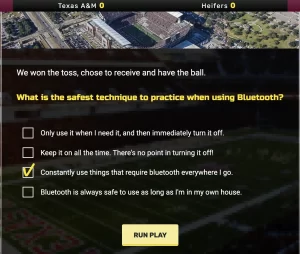
The Texas A&M University developed another quiz called Football Fever, which is — you guessed it — based on an American football theme.
During the quiz, you get cyber security questions but packaged in an American football theme. It’s clever and fun, but a bit distracting from the real-life consequences that cyber attacks can have.
If you fail to answer a question correctly (”Interception!”), you are given feedback instantly.
Again, this cyber security quiz is a fun way to freshen up your team’s cyber security knowledge during a one-time event, but not a long-term training solution.
Pros
- It’s free
- You receive instant feedback
- The American football storyline is entertaining
Cons
- Not a long-term training solution
- A bit childish
📚 Related: The best social engineering quizzes in 2024
5. Counterintelligence Trivia Twirl
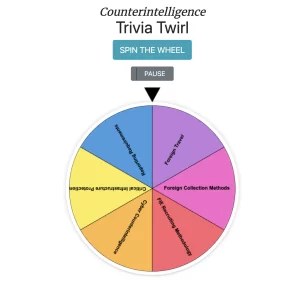
Who doesn’t like to spin the wheel? It’s a nice touch to this security awareness quiz called Counterintelligence Trivia Twirl. After spinning the wheel, you get assigned a quiz with questions about a specific category. It’s a fun one-off exercise that you can do with colleagues, but since it can be completed in about 20 minutes, it’s not a solution for long-term training purposes.
Pros
- It’s free
- Spinning the wheel is a nice touch of gamification
Cons
- Not a long-term solution for training
- Not all relevant cyber threats are covered
6. Deepspace Danger

Another security awareness quiz for employees with a creative theme is called Deepspace Danger. The quiz is part of a game that is situated in outer space. You get to see a lot of long animated videos that tell the story. In short: you have to answer questions about cyber security right to make it back to earth safely.
Since there is only one question after every video, it takes a while to complete.
Pros
- Made for long-term training
- Very creative animations
Cons
- The theme is not related to business
- The videos take up a lot of time
- The pricing for this solution is not stated on the website
7. Cyber Awareness Challenge 2026 (US Department of Defense)
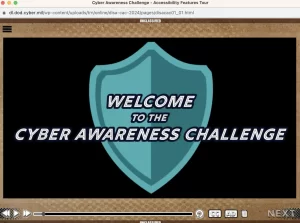
The US Department of Defense created its own cyber security quiz too. For obvious reasons, cyber security awareness is essential for its employees. The quiz is part of a game that looks somewhat outdated and uses animated videos. The quiz covers a wide array of topics, including USB sticks, social engineering, phishing, and more.
The videos are somewhat outdated, which makes it time-consuming for your employees to complete. However, the quality of the questions is good.
Pros
- It’s free
- The storyline is based on a true business
Cons
- The videos are time-consuming
- The animations are outdated
8. Hoxhunt

Hoxhunt offers a comprehensive security training program for employees. The program is one of the most widely used of its kind, with thousands of clients. Hoxhunt uses a combination of ongoing training, backed up by tests and quizzes to gauge each employee’s security knowledge. Each information security quiz for employees is designed to test the individual’s understanding of Hoxhunt’s training materials, allowing their future training sessions to be tailored to that employee’s level.
Hoxhunt also uses simulated attacks and other challenges to create a more holistic picture of an employee’s security behavior. For most employees, the trainings will be highly relevant and useful. Those with a strong existing set of cyber security skills might find the level rather basic, however.
Pros
- Gamification through quiz scores and a shared leaderboard encourages users to engage with the material.
- Ongoing training ensures that users continue to improve and retain knowledge.
Cons
- Not the cheapest option, although customers feel that it’s worth the additional cost.
- The low training ceiling might make the material less relevant for skilled users.
📚 Related: Compliance quizzes for employees
9. NINJIO

Ninjio Security Awareness’ principal claim to fame is its top-quality training videos, which deliver information in an engaging and memorable way. After each video, there’s a security awareness quiz for employees with a set of true or false questions for the learner to answer.
Participants are scored on the accuracy of their responses — three points for getting all the questions right on the first try, two points for getting the questions right on the second try, and one point for succeeding on the third try. If a participant needs more than three attempts, they don’t get any points but still need to get all the questions correct before the quiz can be marked as completed. It should be possible for any user to complete a module based on the information in the training video.
Pros
- Polished and entertaining training videos
- Thorough testing with gamification to reward attentive learners
- Automation makes this product less time-consuming to operate
Cons
- Once a learner has completed a module and passed the quiz, it’s hard to go back and watch the training videos again
10. Phished

Phished is an automated training platform that aims to drive behavior change through training, simulations, tests, and quizzes. While Phished focuses strongly on malicious emails, it does cover a range of other threat vectors in its training and alerts. Phished uses machine learning to identify the training materials that will be most valuable for a particular learner and ensures that they have understood the content.
Phished’s customers are generally very happy with the product, citing the customizability of the training, the extensive library of videos and other material and its overall effectiveness in creating a security-aware employee base. Regular quizzes check that learners are progressing, using true/false and multiple choice questions.
Pros
- Large, varied training library
- Engaging quizzes and tests
- Convincing phishing email simulations helps keep employees on their toes
Cons
- A lack of user-friendliness. While the end-user interface is fairly intuitive, some clients struggle with the control dashboard
- Setup can be complicated and time-consuming
11. Arctic Wolf

A major player in the cyber security space, Arctic Wolf offers a range of valuable products and services as an integrated platform. These include its Managed Security Awareness solution, which delivers training as a concierge service. Using training materials, simulations, and engaging tests and quizzes, this service aims to create cultural and behavioral change among employees to make the organization more resilient against cyber threats.
By completing true/false and multiple choice quizzes, learners can score points and work their way up a leaderboard. This encourages learner engagement and provides admins with valuable insights into their progress. Arctic Wolf also provides reporting tools that help admins assess employees’ progress.
Pros
- Microlearning content keeps users engaged without taking up too much time or attention
- Gamification improves participation
- Concierge-style services make implementation much easier, taking the strain off admins
Cons
- Arctic Wolf’s concierge model is expensive, although customers regard it as worth the additional cost
📚 Related: The 17 best data privacy quiz solutions for employees
12. Usecure

Compared with similar products, Usecure is touted as one of the easiest to implement. It is more basic than some of its competitors but provides thorough and comprehensive security training. Using story-based videos and regular quizzes, Usecure provides demonstrable improvements in users’ security awareness. The videos are basic in style, using simple cartoon animations and presentations to deliver information.
There are also interactive lessons to improve engagement. Following each training module, users receive a brief quiz to check their understanding. Usecure provides baselining, to get a general picture of employees’ cyber security knowledge and a measure of how much progress they’re making. Usecure also has a number of other features that some customers may value, such as dark web monitoring to get ahead of any possible security breaches.
Pros
- Interactive learning and quizzes make the training more engaging for end users
- Very extensive library of materials
- Dark web monitoring
Cons
- Training materials are less polished than some competitors’ and the cartoons can feel dated
- Customer service isn’t always available
13. Awaretrain

Awaretrain is a smaller player on the security training scene but they’re well-established, with ten years of training provision. They provide a library of 60 training modules that can be assembled into customized training programs. Awaretrain updates its library of content regularly, ensuring that it remains relevant and includes current security threats.
Six new modules are added each year. The content itself is fairly polished, engaging and designed to hold learners’ attention. There is a combination of passive video lessons and more interactive material, such as games and quizzes. In-depth lessons take around 15 minutes to complete, while three-minute “snacks” help keep knowledge fresh and introduce important security points in a quick and effective way.
Overall, the training is well-designed and easy for clients to customize into suitable training programs. Each module includes at least one security awareness quiz for employees. The visuals are up-to-date and memorable, and certificates of completion can be given to employees as a morale boost. On the downside, those 15-minute videos can feel like a lecture to some.
Pros
- Varied and engaging content
- Plenty of challenging games, tests and quizzes
- Extensive gamification makes learning enjoyable and encourages engagement
- Customizable training programs
Cons
- The longer training videos can make learning something of a passive experience. Some reviewers would have preferred more interactive content
Are cyber security quizzes worth your time?
Security awareness should be a key element of any cyber security strategy. No matter how hard you have worked on setting up the best firewall and other means of protection, there is always a cyber criminal that knows how to slip through the cracks. And at that moment, you want your team to know how to act in the face of a cyber threat.
A cyber security quiz is a fun way to train the awareness of your employees, while the more traditional methods may put your employees to sleep. However, you should look for a solution that offers regular quizzes. A one-time quiz is helpful, but only with regular training does the knowledge truly stick with your team members.
Which cyber security quiz should you use?
For a quick individual check, the 5 questions above and the free quizzes in this list will tell you where you stand today. For a one-off team session, pick one of the game formats and make an event of it. But if the quiz results show real gaps, a yearly test won’t close them. That takes short, recurring training, and that’s exactly the gap Guardey fills: a 3-minute challenge per week, phishing simulations in between, and a dashboard that shows the score actually improving.
Frequently asked questions
Is this cyber security quiz free?
Yes. The 20 questions above are free to use, copy and share with your team. No sign-up.
What is the difference between a cyber security quiz and a cyber security test?
A quiz checks knowledge: do you know what to do? A test or baseline assessment measures behaviour across a whole organization, usually with a phishing simulation. Use the quiz to start the conversation and a security awareness test to measure where your organization actually stands.
Can I get a certificate?
Not from this page. Platforms such as Guardey provide completion reports per employee, which is what auditors ask for under NIS2 and ISO 27001.
How often should employees do a cyber security quiz?
Short and frequent beats long and rare. A three-minute quiz every week keeps knowledge fresh; a yearly 45-minute module is forgotten within weeks.