
20 August 2025 • Cyber security

95% of all data breaches are caused by human error:
- Using a weak password
- Not updating software
- Clicking phishing links
And the list goes on.
To decrease the chance of a data breach, companies need to train their personnel to recognize cyber threats and act accordingly. The best way to do so is by using the right security awareness training software.
But with a wide variety of software solutions available, how do you know which security awareness training software solution is the right one for your business? We’ve analyzed about eight different options and 8000 reviews on websites such as G2 and Capterra to help you find the best one.
Want to try security awareness training right away?
Guardey trains your team with weekly challenges of three minutes, phishing simulations included. Try it free for 14 days and see how your team responds before you compare the rest.
Try Guardey free for 14 daysHow to choose a security awareness training software provider
Not all awareness platforms are created equal — and depending on your team size, culture, and goals, the right choice can look very different. Below, we break down the key things to consider before choosing a provider. You’ll see these same categories come back in every vendor breakdown to help you compare apples to apples.
💰 Pricing range
Let’s be honest: pricing is often opaque in this market. Many vendors don’t publish rates publicly, which forces you into demos before knowing if it’s even in budget. And when they do give pricing, it’s not always apples-to-apples — some charge per feature, others per user, some bundle everything. That’s why we’ll highlight pricing transparency, total cost, and what you actually get for your money with each vendor.
👓 Learning style
Are you getting video lessons, quizzes, phishing simulations — or a mix of all three? Some platforms offer personalized content, gamification, or interactive formats. Others stick to basic modules that can feel dry or repetitive. We’ll explain what the training actually looks like, how it’s delivered, and whether it holds people’s attention.
⏱️ Training frequency & duration
Do you want training every week, every month, or just once a year? Some vendors send out micro-learnings regularly, others leave it to admins to plan everything. We’ll show how flexible each platform is, how much time users spend on training, and how much effort it takes to run campaigns.
🗣️ Languages & localization
If your team spans multiple regions, language support is key. But it’s not just about having translations — it’s about how natural the content feels. Is it “local enough” to resonate? Or does it sound like an American export with a Dutch subtitle? We’ll call out who gets localization right (and who doesn’t).
👩💻 Integrations & admin features
Admin experience matters more than vendors like to admit. A platform might look slick on the user side but feel clunky or rigid in the backend. We’ll evaluate how easy it is to set up training, manage users, pull reports, and connect to tools like Microsoft 365, Teams, or your SSO provider.
☀️ What sets them apart
This is where we highlight each vendor’s edge. Whether it’s top-tier phishing simulations, Netflix-style video content, or automation that actually works — we’ll surface what they do best so you can match it to your needs.
🚩 Possible red flags
Every platform has downsides. Maybe the training feels too basic. Maybe the dashboards are a mess. Maybe pricing creeps up fast. In this section, we won’t hold back. You’ll get a straight look at where the platform might fall short.
🏆 Best for…
Finally, we’ll summarize who the platform is best suited for — small teams or large enterprises, hands-off admins or high-control setups, content-first buyers or phishing-first defenders. If a platform isn’t a fit for your situation, you’ll know here.
The 8 best cyber security awareness training software solutions in 2025
- Guardey
- Proofpoint
- KnowBe4
- Usecure
- Phished
- Hoxhunt
- Metacompliance
- NINJIO
1. Guardey
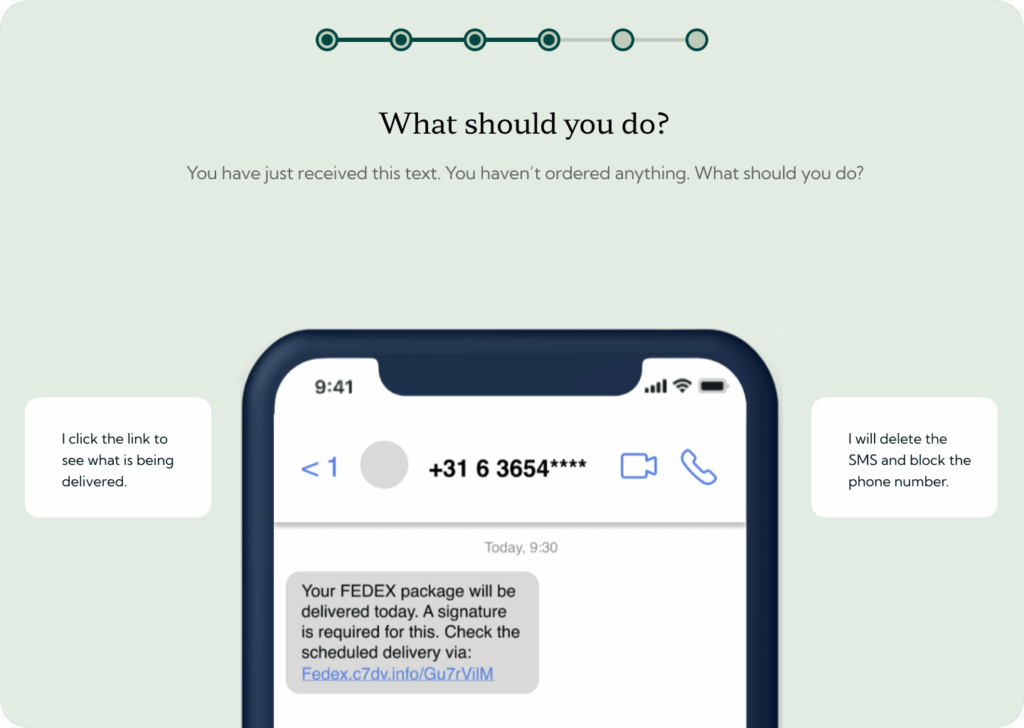
Guardey is built to make security awareness training something employees actually enjoy — and remember. Instead of long, one-off modules, it delivers short, gamified lessons every week. The goal isn’t just compliance but a real culture shift: people who recognize threats and take action before incidents happen.
💰 Pricing range
Guardey prices on user count alone, with no minimum team size and no add-ons, and your quote lands within 24 hours. Customers often highlight that it delivers strong value without the overhead that comes with heavier platforms.
👓 Learning style
Every lesson is interactive and gamified. Employees step into real-world scenarios — phishing attempts, password challenges, social engineering tricks — and make decisions that impact the outcome. This hands-on approach keeps attention high and builds lasting skills.
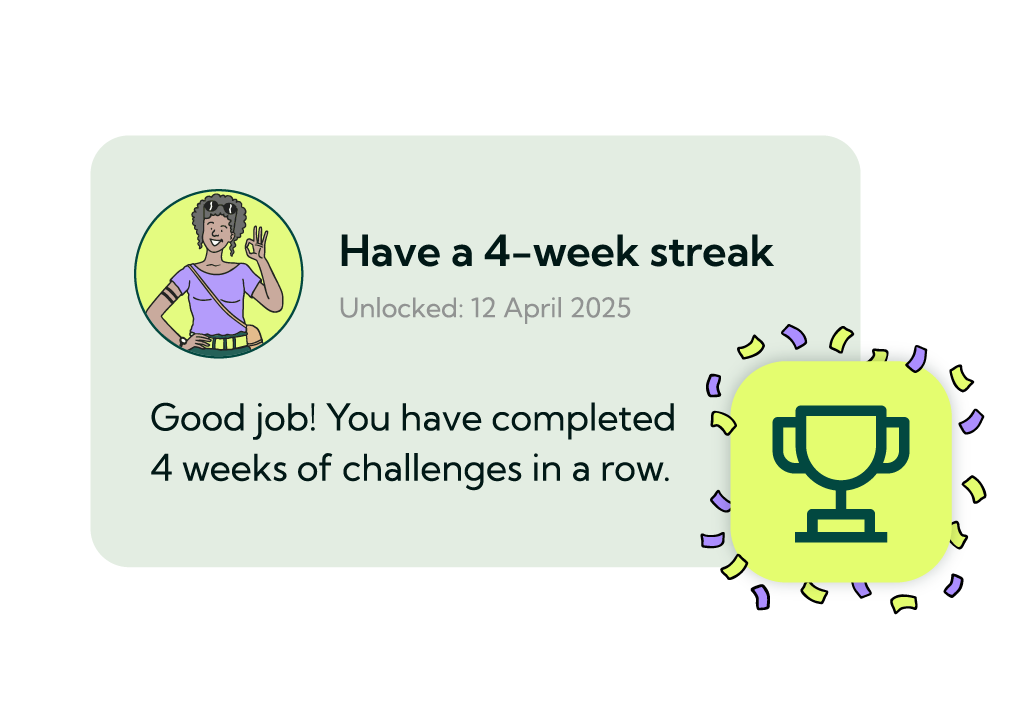
Curious about the gamification? You can try out Guardey challenges for free.
⏱️ Training frequency & duration
Training takes just 3 minutes per week. That consistency turns security awareness into a habit rather than a box to tick once a year. It’s short enough not to disrupt daily work, but frequent enough to change behavior over time.
🗣️ Languages & localization
Guardey supports multiple languages and is designed with global teams in mind. The content feels natural in different regions, avoiding the “lost in translation” issue common in security training.
👩💻 Integrations & admin features
The platform integrates seamlessly with Microsoft 365 and Google Workspace, making rollout simple. Admins get clear reporting dashboards, automated insights, and easy user management. It’s built to be lightweight — no steep learning curve required.
☀️ What sets them apart
Guardey’s focus is culture change. Weekly gamified challenges keep employees engaged and invested, while admins get the insights they need to measure real progress. Instead of being a once-a-year compliance activity, Guardey makes security part of everyday work life.
🚩 Possible red flags
Guardey doesn’t try to be everything. It’s not a massive video library or a compliance-only platform. If you’re looking for depth in certifications or traditional long-form courses, you may need to supplement elsewhere.
🏆 Best for…
Organizations that want to build a proactive security culture, not just pass audits. Guardey is ideal for teams that value simplicity, consistency, and engagement — whether you’re a 50-person startup or a global enterprise.
🧑 Customer review
“The uptick in training participation has been fantastic. In most cases, when somebody gets started, they’re regularly performing the training. I think this is because Guardey doesn’t take a lot of time. And most of all, it’s fun. Employees have even set up their own little competitions internally. So we have the company-wide leaderboard, but the teams themselves are now even having their little competitions in Microsoft Teams group chats. Guardey has brought out the competitive nature in them.” – Source
→ Schedule a demo with Guardey
2. Proofpoint
Proofpoint is one of the biggest names in enterprise security and offers a training solution that fits neatly into their broader email security ecosystem. They’re known for their massive content library and deep phishing simulations, but also for a platform that can feel heavy for smaller teams.
💰 Pricing range
Proofpoint doesn’t put clear pricing on their website. From reviews, it’s obvious this is an enterprise-level tool with a price tag to match. Several users mention that smaller businesses will find it expensive. If budget is tight, this may not be the right fit.
👓 Learning style
The platform leans on a big content library: videos, phishing simulations, quizzes, even some gamified content. There’s a lot of variety, which keeps it from feeling too repetitive. That said, some reviews note the modules can get a little dry or too simplistic depending on the audience.
⏱️ Training frequency & duration
You can run one-off campaigns, monthly refreshers, or bigger annual rollouts. Flexibility is there, but it depends on how much time admins want to put into setup. Some reviewers run micro-modules of 15 minutes a month, others stick to quarterly campaigns.
🗣️ Languages & localization
Proofpoint supports multiple languages, but reviewers point out that translations aren’t always perfect. Non-US customers sometimes feel the tone of content is “too American.”
👩💻 Integrations & admin features
It integrates neatly with Microsoft 365, Azure AD, and of course with Proofpoint’s own email security stack. That’s where it shines. The downside? Admins complain about clunky dashboards, multiple logins, and steep learning curves. Reporting is powerful but not always intuitive.
☀️ What sets them apart
Proofpoint’s strength is scale. Huge template libraries, deep phishing simulations, and direct integration with their broader security ecosystem. If you already use Proofpoint email security, this feels like a natural extension.
🚩 Possible red flags
The negatives come up often: UI that feels outdated, reporting that’s slow or confusing, translations that miss the mark, and a general sense of “compliance box-checking” rather than culture change. For SMBs, the price is often prohibitive.
🏆 Best for…
Enterprises that already run on Proofpoint and want awareness training tightly integrated with their email defenses. It’s a big, heavy solution. Perfect for ticking compliance boxes at scale, less suited for companies looking for lightweight, engaging culture-building.
🖊️ Author’s review
After going through dozens of reviews, one thing is clear: Proofpoint is powerful, but it comes with weight. I’ve seen clients move away from it because it felt too heavy and expensive compared to more agile tools. Admins often complain about the multiple portals and clunky UX. On the other hand, if you’re a 5,000-employee enterprise already using Proofpoint email filtering, the integration is hard to beat.
For small to mid-sized companies, Proofpoint probably isn’t your best bet. This is mostly because putting together content programs from its huge library can be a tough task for small teams, let alone for one CISO.
🧑 Customer review
“The UI is not very intuitive. For simple things such as archiving users, when selecting a whole page, only the page advancement is on the bottom to continue to the next.” – G2
3. KnowBe4
KnowBe4 is the most recognized name in the awareness training space. They’ve been around for years and dominate the market with aggressive sales tactics and a huge library of phishing simulations. Almost every CISO has heard of them. That said, popularity doesn’t always equal quality — reviews often highlight both the breadth of content and the clunky, dated feel of the platform.
💰 Pricing range
Knowbe4’s pricing structure is opaque, making it difficult to determine how much it might cost an organization without seeking a quote. However, feel free to check if you can make sense of their pricing page yourself.
From what I’ve seen in reviews and heard in conversations with customers, it’s on the expensive side, especially if you want access to the full content library. Smaller businesses often find themselves priced out or pushed into upsells.
👓 Learning style
The training is mostly video-based with quizzes and phishing simulations layered on top. They have hundreds of templates and scenarios, but the content itself can feel repetitive. Gamification is minimal.
⏱️ Training frequency & duration
You can set up frequent phishing campaigns or training sessions. Flexibility is there, but the modules are often 20–30 minutes long, which isn’t ideal for knowledge retention. There is also short, snackable content, which means your admin will need to sift through a lot of content.
🗣️ Languages & localization
KnowBe4 supports a wide range of languages, which makes sense given their global customer base. Still, reviewers mention that translations can feel awkward and the cultural tone doesn’t always land outside the US.
👩💻 Integrations & admin features
The integrations are solid: it connects with Active Directory, HR systems, and various LMS platforms. The admin side is powerful but overwhelming for some. Multiple reviewers describe the dashboard as “dated” and hard to navigate, with too many clicks to get simple things done.
☀️ What sets them apart
Sheer scale. KnowBe4 has the largest template library and phishing simulation options on the market. If you want variety and endless customization, they’ve got it. Perfect if you have the team to carry the workload that comes with it.
🚩 Possible red flags
A lot of red flags come up in reviews: outdated UX, long training modules, aggressive upselling, and a heavy focus on compliance rather than actual behavior change.
🏆 Best for…
Enterprises that want a massive library of phishing simulations and have a big security team to manage it all. If you need volume and compliance reporting at scale, KnowBe4 can deliver. If you want engaging, modern, lightweight training, there are better options.
🖊️ Author’s review
I’ve spoken to several customers who switched away from KnowBe4 to Guardey, and their feedback is consistent: the platform feels bloated, the content isn’t engaging enough, and the admin side takes too much time.
→ Learn why this International School switched from KnowBe4 to Guardey
4. Usecure
Usecure is a UK-based awareness platform that positions itself as lightweight, flexible, and tailored to individual risk profiles. Unlike the heavy enterprise players, they focus on SMBs that want easy onboarding, quick wins, and training that adapts to each user. They’re not as flashy as the big names, but their simplicity and automation make them appealing.
💰 Pricing range
Usecure doesn’t publish pricing openly on their website. From customer reviews, it’s positioned as more affordable than heavy enterprise vendors like Proofpoint or KnowBe4, but you’ll need to request a quote to get exact numbers. Several SMB users mention that it was cost-effective for smaller teams, especially compared to larger platforms.
👓 Learning style
The platform delivers training through short interactive videos and quizzes. You can choose between two “tones”: a more playful “fun” style or a corporate-friendly option. It’s not gamified in the Guardey sense, but the flexibility is appreciated by admins.
⏱️ Training frequency & duration
Training frequency is adaptive: Usecure builds a personal risk profile per user and then assigns modules accordingly. That means some users get more training than others, based on their weaknesses. Sessions are short, usually under 10 minutes.
🗣️ Languages & localization
Usecure supports multiple languages, but the strongest focus is English-speaking markets. The translations are more limited compared to global vendors.
👩💻 Integrations & admin features
Admins like the simplicity of the dashboard. It’s easy to launch baseline tests, monitor progress, and assign courses. Integrations are there but limited — this isn’t built for large-scale enterprise IT ecosystems, it’s built for SMB ease of use.
☀️ What sets them apart
The adaptive risk profiling. Instead of giving everyone the same modules, Usecure tailors training to each employee’s vulnerabilities. That keeps it more relevant and efficient.
🚩 Possible red flags
Some reviewers complain that the training can get repetitive, even if modules are technically different. Larger companies may find the reporting and integration options too basic. It’s a simple platform, which is a plus for SMBs but a minus for enterprises.
🏆 Best for…
Small to mid-sized businesses that want an easy-to-use platform with automated personalization. If you don’t have time for heavy admin work, Usecure’s automation is a strong plus.
🖊️ Author’s review
When I looked at Usecure, I liked the idea of adaptive training. It makes sense: why give everyone the same modules if only a few need extra work? But from reviews, I noticed that customers sometimes get bored with the repetition.
🧑 Customer review
“It’s very easy to use but the best thing is the ability to instantly send out a baseline test to your users and this then builds up a safety profile and any further testing will close user-specific gaps first. Some of the training can get a bit repetitive. They do add more training but some users will complain about getting the same training over and over even though it has different levels.” – G2
5. Phished
Phished is a well-known name in phishing simulation and awareness training — especially in Europe. What I found is a capable platform, but one that’s laser-focused on phishing and leaves a few things on the table if you’re looking for a broader security awareness approach.
💰 Pricing range
Phished doesn’t publish pricing on their website. You’ll need to go through a demo and get a custom quote. Based on research and multiple conversations, pricing usually lands between €5 to €6.50 per user per month, depending on your license and setup.
Worth noting: if you’re a smaller company (under 500 users), you can’t buy their training separately — it only comes bundled with their phishing simulations. That pushes the price even higher.
👓 Learning style
Phished offers a mix of phishing simulations, quizzes, and short video lessons. There’s some level of personalization — training adapts to a user’s behavior and risk score — but it’s not gamified in any meaningful way. The training is short and digestible, but some users say it can feel too simplistic or repetitive over time.
⏱️ Training frequency & duration
Lessons are brief (a few minutes each) and scheduled automatically. Phishing simulations are sent at random intervals, which keeps users alert. The “hands-off” nature of the platform is a plus if you don’t want to manage campaigns manually, but it also means you lose some flexibility in targeting or pacing.
🗣️ Languages & localization
Phished supports a wide range of languages, and their phishing templates are localized to brands and countries. That’s a big plus for international teams. That said, some users mentioned a “Belgian touch” to the phishing emails that made them easier to spot or feel less realistic outside of that market.
👩💻 Integrations & admin features
Setup is smooth, and the platform runs mostly in auto-mode. That’s great for busy IT teams or MSPs. Admins get access to dashboards, risk scores, and behavioral metrics, but multiple reviews mention that reporting could be more detailed or easier to drill down into. Custom training is possible but not always intuitive to build.
☀️ What sets them apart
Phished excels in automation. Once it’s set up, it runs with minimal input, sending randomized, tailored phishing emails and matching training content to user behavior. Their “Zero Incident Mail” feature also rewrites unknown links for added protection, which goes beyond basic awareness tools.
🚩 Possible red flags
Many reviews call out the simplicity of the training content. For more technical teams, it can feel too basic. Reporting, while visually nice, lacks depth for those who want to dig into team-level data. And the lack of gamification may hurt engagement over time — especially for companies trying to build a security-first culture.
🏆 Best for…
Mid-sized to large companies that want a hands-off phishing simulation platform, with some awareness training on top. Phished is especially useful for IT teams that don’t want to spend time managing campaigns manually. It’s less ideal for companies that want to drive real culture change or engagement.
🖊️ Author’s review
Phished gets a lot right when it comes to automation. I’ve seen companies enjoy the peace of mind it offers — phishing emails go out, training trickles in, and the dashboards show decent engagement. However, the training does seem to be very focused on phishing. Even though phishing is the biggest cyber threat out there, it’s still only one of many.
🧑 Customer review
“Phished.io is a great platform to organize automated phishing exercises where recipients receive phishing simulations with tailored content. My minor dislike is that more in-depth reporting features would be nice to have.” – G2
6. Hoxhunt
Hoxhunt is one of the biggest names in security awareness training, especially for enterprise organizations. The platform is built around gamified phishing simulations that get smarter over time. It’s well-designed, widely used, and comes with a serious reputation. But it’s also priced accordingly — and depending on your company size and goals, that can be a dealbreaker.
💰 Pricing range
Hoxhunt doesn’t publish pricing on their website. No free trial either — you’ll need to schedule a demo and go through the sales team.
Still, I did my homework. Based on conversations with current and former Hoxhunt customers, Hoxhunt charges around $11,000 for 100 users on a 2-year deal. That comes down to about €4.85 per user, per month.
👓 Learning style
Hoxhunt is gamified at its core. You earn stars, climb leaderboards, and unlock achievements. It doesn’t feel like boring compliance training — and many users genuinely enjoy the experience. The phishing emails are frequent and often realistic, and there’s immediate feedback after every click or report.
But not everything clicks. Some reviews mention the training can get repetitive: all questions are multiple choice, and there’s not much variation in how the content is delivered. Over time, simulations can become predictable — they start to feel like “Hoxhunt emails” rather than actual threats.
⏱️ Training frequency & duration
Phishing simulations are sent regularly — not too often, not too sparse. After each simulation, a short micro-lesson is triggered. The training is quick and well-integrated into daily workflows. But the scoring system is time-sensitive: you get penalized for reporting late, or missing a simulation during time off. Not ideal if you’re in meetings all day or just back from vacation.
🗣️ Languages & localization
Hoxhunt supports a wide range of languages and is built to serve global organizations. I didn’t find many complaints about translation quality or localization — a good sign for international teams.
👩💻 Integrations & admin features
The Outlook integration is one of Hoxhunt’s strongest points. It makes onboarding seamless and reporting a one-click process. But on the admin side, it’s a mixed bag. While it’s powerful, it’s not always intuitive. Creating training flows, assigning modules, and interpreting data can be time-consuming — especially for smaller teams with limited capacity.
☀️ What sets them apart
- Some of the most realistic and adaptive phishing simulations in the market.
- Gamification isn’t just a buzzword — it’s deeply baked into the platform.
- The behavior change is real. I’ve seen users become more alert in and outside of work.
🚩 Possible red flags
- Price — It’s expensive, and pricing isn’t transparent.
- Repetitive training — Some users report it gets stale.
- Scoring quirks — You get dinged for slow reporting or being on vacation.
- No self-serve trial — You can’t test it without a sales call.
🏆 Best for…
Enterprise companies with big budgets and time to build a tailored training program. If you want an advanced phishing simulation platform with deep gamification, Hoxhunt delivers. But it’s probably overkill for smaller organizations or lean security teams.
🖊️ Author’s review
Hoxhunt gets a lot right. I’ve seen users genuinely enjoy the experience, which is rare in this space. The phishing simulations are sharp, the UX is smooth, and the gamification is well executed. But the price tag, lack of transparency, and the time it takes to manage the backend make it a tough sell for mid-sized teams.
If you’ve got the scale and resources, Hoxhunt is a solid pick. If not, there are leaner, more flexible alternatives worth considering.
🧑 Customer review
“It’s a bit easy to cheese it, and after a while it becomes more a matter of looking for Hoxhunt emails rather than being aware of phishing and scams. It also doesn’t take into account if you are on leave and that ruins parts of the gamification of the product.” – G2
7. MetaCompliance
MetaCompliance is a flexible awareness training platform that combines video-based training, phishing simulations, and policy management. It stands out for its multilingual capabilities and content variety, especially the “Netflix-style” learning experience. But it’s not without friction — especially for admins managing setup and multilingual campaigns.
💰 Pricing range
MetaCompliance doesn’t publish pricing on its website, and there’s no self-serve trial. That puts it in the same “call sales” category as others. Based on reviews, the platform serves companies from small business to large enterprise — which suggests pricing is more flexible than some premium tools. But the lack of public pricing still adds unnecessary friction during evaluation.
👓 Learning style
The platform focuses on short, fast-paced modules — often under five minutes — with explainer videos, nano-learnings, and interactive quizzes. Some reviewers love the Cyber Police-style storytelling. You can also build your own training and assessments, which adds flexibility.
Gamification isn’t a big part of the MetaCompliance platform. It relies more on content variety than leaderboards or point systems. That might be fine for some users — but for others, especially those looking to boost engagement, the absence of true gamification is noticeable.
⏱️ Training frequency & duration
Training is designed to be consumed quickly. Organizations can schedule frequent campaigns using short videos and quizzes. The downside is that managing these campaigns — especially across multiple languages or departments — can become time-consuming without the right setup or experience.
🗣️ Languages & localization
This is where MetaCompliance shines. The platform supports a wide array of languages, and many customers highlight how easy it is to run global campaigns. A few reviews note that translation speed could be improved when new content drops, but overall, the localization is strong.
👩💻 Integrations & admin features
MetaCompliance integrates with Microsoft Teams and supports Single Sign-On, which makes rollout smoother. Admins get tools to build campaigns, combine pre-built and custom content, and export reports. But the interface gets criticism: it’s functional, not intuitive. Some features feel buried, and the learning curve for new admins is real.
☀️ What sets them apart
- Massive, constantly updated content library with videos, quizzes, and interactive formats.
- Strong Microsoft Teams integration and SSO support.
- Known for excellent customer support. Multiple reviewers praise specific support staff by name.
- Combines phishing, training, and policy compliance in one platform.
🚩 Possible red flags
- Steep admin learning curve, especially for campaign setup.
- Some performance issues when configuring or running large campaigns.
- Reporting is decent but lacks deep drill-downs or advanced analytics.
- No transparent pricing or self-serve access.
- Setup requires time — this isn’t a plug-and-play solution.
🏆 Best for…
Organizations that need flexibility and multilingual capabilities across regions. If you want to combine training, policy compliance, and phishing in one tool — and have the time to manage it — MetaCompliance could be a good fit. But it’s not for teams looking for a quick setup or “set it and forget it” experience.
🖊️ Author’s review
MetaCompliance has a lot to offer. The content is engaging, the language support is strong, and the customizability makes it versatile. But it demands time. Admins need to invest in learning the system and building out campaigns. If you’ve got the resources and want full control over your security training stack, MetaCompliance is worth exploring.
Just know it won’t run itself out of the box.
🧑 Customer review
“It’s quite a large platform, and not everything can be found as easy as we would like. Sometimes you don’t know the right word for something, and it makes it difficult to find.” – G2
8. Ninjio
NINJIO is what happens when you combine Netflix-style storytelling with cybersecurity training. Instead of boring slide decks or stale quizzes, NINJIO delivers short animated episodes — each one dramatizing a real-world cyber incident. It’s fun, fast, and clearly beloved by users. But like any cinematic universe, it’s not perfect.
💰 Pricing range
There’s no public pricing on NINJIO’s website, so you’ll need to contact sales for a quote. That said, based on user reviews, this isn’t a budget tool — especially for small businesses. A few customers mention subscription costs as a concern. The platform is clearly designed to serve a range of companies, from SMBs to enterprise, but pricing transparency is lacking.
👓 Learning style
This is where NINJIO shines. The platform delivers 3–5 minute animated episodes inspired by recent real-world attacks, with strong storytelling and top-tier voice acting. Users genuinely enjoy the content, some even binge-watch the back catalog. The lessons are accessible and memorable, and there’s a clear focus on changing user behavior both at work and at home.
That said, advanced users may find the content a bit surface-level. It’s great for awareness, but less suited for technical deep dives.
⏱️ Training frequency & duration
Most customers run monthly episodes, which keeps training regular and low-friction. There’s also a phishing simulation tool that can run quarterly or alongside the video content. Some admins wish they could push more content — even two episodes per month — because engagement is so high.
🗣️ Languages & localization
While the platform seems to focus primarily on English, it’s used globally and supports SCORM exports for use in third-party LMSs. There’s limited info in reviews about multilingual capabilities, so if localization is key for you, it’s worth confirming during your demo. It seems logical that localizing so much video content would be a huge risk, though.
👩💻 Integrations & admin features
This is where things get messy. NINJIO recently migrated to a new admin platform, and reviews are split. Some love the improvements; others complain about missing features (like the ability to resend videos), clunky dashboards, and reporting that’s hard to navigate. The platform integrates with Microsoft 365 and Entra ID, and SCORM packages make LMS integration easy, but you’ll likely spend time getting familiar with the system.
☀️ What sets them apart
- Bite-sized, cinematic content that people actually enjoy watching.
- Topics stay fresh and timely, often based on current headlines.
- Strong impact on employee behavior — users report more phishing attempts flagged and discussed.
- High adoption across both technical and non-technical teams.
- Optional “Friends & Family” licensing to train beyond the workplace.
🚩 Possible red flags
- The new admin platform has stability and usability issues.
- Reporting could be more intuitive and flexible.
- Not ideal for companies that need in-depth, technical content.
- No clear pricing, and some find it pricey for what you get.
- Sending reminders or managing user engagement takes manual effort.
- High focus on video, which can make for a passive and long-winded learning experience.
🏆 Best for…
Teams that want a fun, low-lift way to keep cybersecurity top of mind. If you’re trying to boost engagement, make training stick, and avoid compliance fatigue, NINJIO delivers. Just be ready to invest a bit more time managing campaigns, especially while their admin platform matures.
Also, make sure your team is into the cartoons. For some people, it works, for others it may feel a little childish.
🖊️ Author’s review
NINJIO is one of the few platforms where users actually look forward to their training. I’ve heard stories Slack channels lighting up after a new episode drops, with teams laughing about cameos or talking seriously about the security risks they just learned. That kind of engagement is rare.
Still, it’s not a perfect system. You can only train with one episode per month, while other platforms offer weekly training to keep engagement consistent. Besides, the videos can also be deemed childish, so make sure your employees are a good fit.
🧑 Customer review
“The reporting functionality is lacking. I do not want to dive into each campaign to get a report. User-based reporting should include security and phishing.” – G2
The final verdict: choose a security awareness training vendor based on gamification
The number of cyber crime victims have grown dramatically over the past few years. In 2025, it only makes sense to do everything you can to turn your employees into a strong human firewall that recognizes cyber threats and acts accordingly.
For advanced security awareness training that is recurring, engaging, and most of all effective, sign up for Guardey or plan a personalized demo.
Ready to pick your security awareness software?
Guardey is security awareness training software built on weekly challenges of three minutes, with phishing simulations included. Try it free for 14 days, no credit card and no sales call.
Start your free 14-day trial