13 November 2026 • Phishing
In brief: A phishing simulation is only useful if it resembles what your employees will really receive. Below are ten simulation examples, ordered from easy to hard, with the lesson each one teaches, who to send it to, and the mistakes that make simulations backfire. Use them as templates for your own program, or run them with a platform that includes them; Guardey’s phishing simulations ship with every scenario on this page.
What makes a good phishing simulation?
Four things. It is realistic: the lure is one your employees see in real life. It is measurable: you record clicks, data entered and, most importantly, reports. It is followed by a lesson: whoever clicks lands on a short explanation within seconds, not a reprimand. And it is varied: difficulty, timing and theme change, so employees learn to spot phishing rather than “the simulation template”.
Difficulty on this page follows a simple scale: Level 1 has obvious signs (generic greeting, odd domain), Level 2 copies a real service convincingly, Level 3 is personalized to the person or the company.
The 10 phishing simulation examples
1. The parcel notification (Level 1)
The email: “Your parcel could not be delivered. Pay €1.95 to reschedule.” Generic carrier branding, a lookalike domain.
Why it works: everyone is expecting something, especially in November and December.
Lesson: fees for parcels are never paid through email links. Send to: everyone, as a baseline.
2. The password expiry (Level 2)
The email: “Your Microsoft 365 password expires in 24 hours. Keep your current password.” Link to a lookalike login page.
Why it works: it looks like the alerts IT really sends, and the deadline creates urgency.
Lesson: open office.com yourself; never log in through an email link. Send to: everyone; it is the most common credential-phishing lure in business.
3. The shared document (Level 2)
The email: “Sanne shared ‘Q4 payment schedule.xlsx’ with you.” Sign-in required to open.
Why it works: the name is a real colleague (simulations may use real internal names, within the rules you set with HR), and the file sounds important.
Lesson: a sign-in page for a document you would normally open directly is the attack. Send to: finance, management, project teams.
4. The HR policy update (Level 2)
The email: “New holiday policy 2027: read and confirm before Friday.” Link to a portal that asks for credentials.
Why it works: everyone wants to know about holidays, and HR emails are rarely questioned.
Lesson: HR documents live in the HR system; go there directly. Send to: everyone. Avoid: bonus or layoff themes, which cause real anger and complaints.
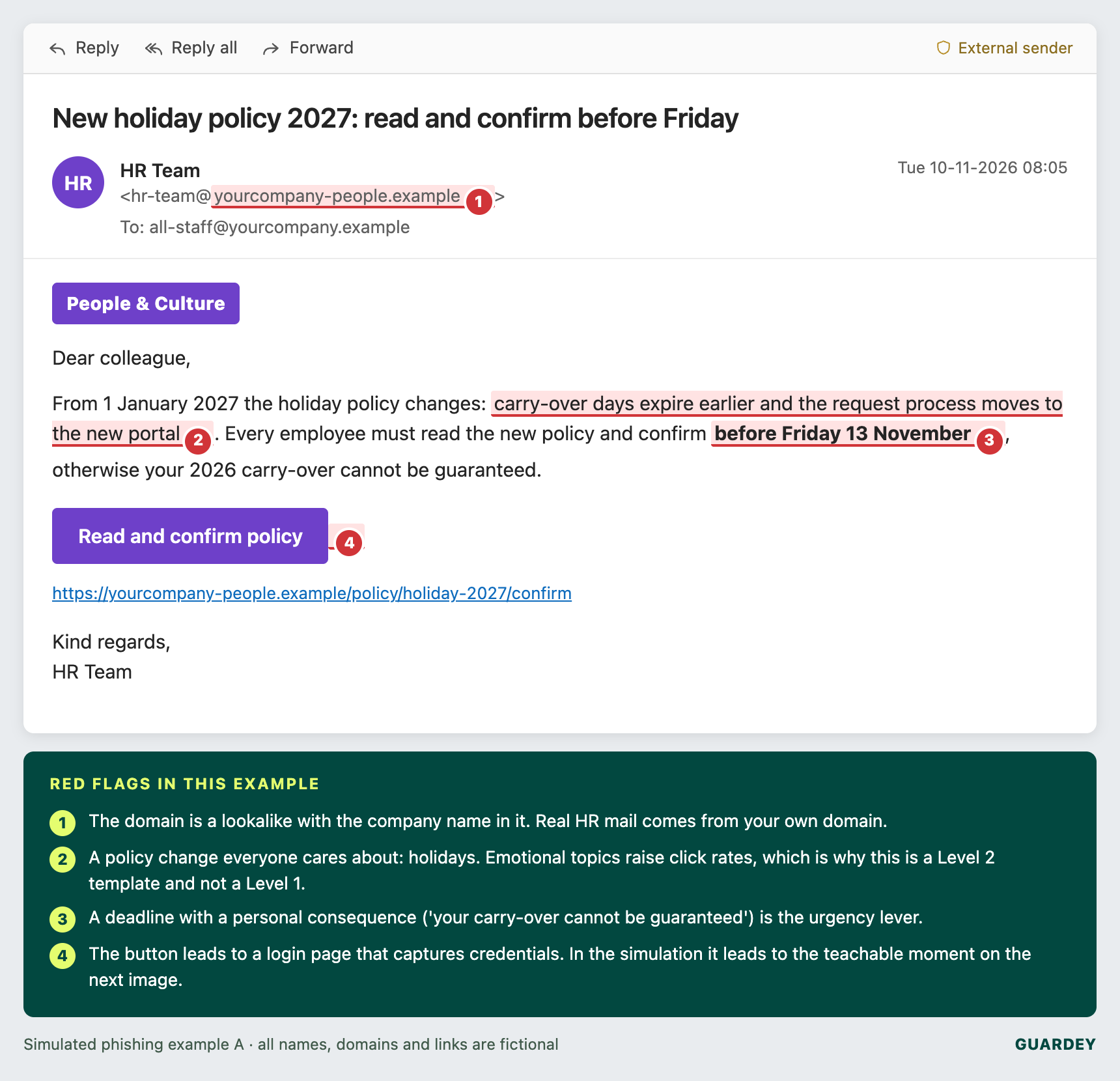
Above: what example 4 looks like in the inbox, with the four red flags employees should learn to spot.
5. The QR code (Level 2)
The email: “Scan to renew your parking permit” or “Scan to re-enable multi-factor authentication.”
Why it works: email security cannot read the code, and scanning moves the employee to a phone with fewer protections.
Lesson: a QR code for a task you would normally do on your laptop is a red flag. Send to: office-based staff; measure scans via a tracked landing page.
6. The invoice with new bank details (Level 3)
The email: an overdue invoice from a real-looking supplier, “please note our bank details have changed”, with a PDF link.
Why it works: finance processes dozens of these a week.
Lesson: bank changes are confirmed by phone on a known number, every time. Send to: accounts payable, purchasing. This is the simulation that prevents the most expensive real incident.
7. The CEO’s quick favour (Level 3)
The email: “Are you at your desk? I need a quick favour, I’m in meetings all day.” From a webmail address with the CEO’s name.
Why it works: authority and a plausible excuse for not being reachable. The second email asks for gift cards or a transfer.
Lesson: any unusual request from leadership is verified by phone, no exceptions, and leadership must endorse that rule publicly. Send to: executive assistants, finance, office managers. Get the CEO’s explicit approval first.
8. The IT helpdesk MFA reset (Level 3)
The email: “Approve the Authenticator prompt you will receive and reply with the 6-digit code to complete the migration.”
Why it works: it mimics a real migration, and the request comes from “IT”.
Lesson: nobody ever needs your code, and prompts you did not start are declined. Send to: everyone, after a Level 2 round. Measure both “approved” and “replied with a code” via a safe form.
9. The hijacked thread (Level 3)
The email: a reply inside a realistic existing conversation with a supplier (“RE: RE: Order 7731”), with “temporary” new payment instructions.
Why it works: context makes it credible; the sender appears to be someone the recipient has been emailing.
Lesson: the request, not the thread, is what you verify. Send to: purchasing and finance, sparingly; this one is hard and should be preceded by training on the topic.
10. The voice call (Level 3, vishing)
The simulation: a phone call from “the bank’s fraud department” or “IT support” asking the employee to confirm details or read out a code. Some platforms automate this; otherwise an internal red-team call works.
Why it works: voice feels more legitimate than email, and employees are rarely trained for it. Cloned voices make it worse; see deepfake awareness training.
Lesson: hang up and call back on a known number. Send to: finance, helpdesk, reception.
Simulation examples at a glance
| Example | Level | Channel | Target group | Metric to watch |
|---|---|---|---|---|
| Parcel notification | 1 | Email, SMS | Everyone | Click rate (baseline) |
| Password expiry | 2 | Everyone | Credentials entered | |
| Shared document | 2 | Finance, management | Credentials entered | |
| HR policy update | 2 | Everyone | Click rate, report rate | |
| QR code | 2 | Email, print | Office staff | Scans |
| Invoice, new bank details | 3 | Accounts payable | Clicks, verification calls made | |
| CEO quick favour | 3 | Email, WhatsApp | Assistants, finance | Replies, report rate |
| IT MFA reset | 3 | Everyone | Prompts approved, codes shared | |
| Hijacked thread | 3 | Purchasing, finance | Clicks, verification calls | |
| Voice call | 3 | Phone | Finance, helpdesk | Details given, callbacks |
Run all ten examples from one platform
Guardey's phishing simulations come with ready-made templates for every example above, plus randomized campaigns so employees cannot warn each other.
Explore phishing simulationsWhat happens after the click
The simulation is only half the exercise. The moment someone clicks, they should land on a page that explains, in plain language, what gave the email away, and offers a short training on the spot. That is the teachable moment, and it is where behaviour actually changes.
How to run them: a 12-month program
- Month 1: baseline with example 1 to everyone. Expect a click rate around a third in an untrained organization.
- Months 2–4: one Level 2 example per month, random days and times, with a three-minute lesson after each click.
- Months 5–12: alternate Level 2 and Level 3, with targeted rounds (6, 7, 9, 10) for finance, HR and assistants every four to six weeks.
- Every month: publish the team result (click and report rate), never individual names.
Five mistakes that make simulations backfire
- Emotional lures. Bonuses, layoffs, health news. They generate anger, not learning, and have ended programs.
- Shaming. Naming clickers, or “three strikes” policies, teach people to hide incidents, which is the opposite of what you want.
- No whitelist. If your mail filter blocks the simulation, you have measured your filter, not your people.
- Same template, same time. Employees learn to spot “the Tuesday 10 a.m. test”. Vary everything.
- Measuring clicks only. The report rate is the metric that matters: an organization where 60% report is safer than one where 2% click and nobody reports.
Frequently asked questions
What is a phishing simulation example?
A realistic but harmless phishing email, SMS, QR code or call sent to your own employees to measure who clicks, enters data or reports, followed by training. The ten above are the standard scenarios.
How often should you run phishing simulations?
Monthly for the whole organization, with extra targeted rounds every four to six weeks for high-risk roles. Quarterly is too rare to change behaviour; weekly causes fatigue.
Are phishing simulations legal?
Yes, with a legitimate interest, informed employees, limited data retention and no disciplinary use of results. Involve the works council where required.
Can I build these myself?
You can, with open-source tools such as Gophish, but you then build the landing pages, the follow-up training and the reporting yourself. Our comparison of 17 phishing simulation tools explains what the free route gives up.
Want to see a 12-month simulation program for your team?
Book a demo and we will build the first campaign with you, including the training that follows each simulation.
Request a demo